Fix Your ePub Formatting: Essential Word Tips

One of the hardest things to do in technology is disrupt yourself.

Matt Mullenweg

Screenshot from My D2D website. If you look carefully, you’ll see two red icons and a processing edit still not active. I’m missing some formats, and my uploaded manuscripts may have passed inspection–but when I check preview, there’s no TOC or the body font is not the best. The Chapter Headings, which can be orphaned between blank pages– are not locked in page break because they were simply enlarged to 18 pct font not using Heading 1. For another example, why are there two Trolleybus of Happy Destiny versions and why are the books not in order of the series? Good questions.

To fix your manuscript formatting for ePub uploads, you must use Word’s Paragraph Styles instead of manual font changes. Conversion engines like Draft2Digital’s “Meatgrinder” or Smashwords rely on the underlying “Style” tags (like “Heading 1” or “Normal”) to build the Table of Contents (TOC) and maintain margins.

1. Fix the Table of Contents (TOC) 

Conversion sites ignore manual text enlargements. You must apply Heading Styles: 

  • Apply Headings: Highlight each chapter title and click Heading 1 in the Word style ribbon.
  • Automatic TOC: On the upload page at Draft2Digital, ensure the “Add a Table of Contents” checkbox is checked. Because you applied “Heading 1” styles, their system will automatically detect these as chapter breaks and build the linked TOC for you.
  • Manual Links (Smashwords): If you prefer a custom TOC, type your chapter names at the front, then use Insert > Link to “Bookmark” each corresponding chapter title in the text.

2. Standardize Body Text and Margins

Formatting issues often stem from “dirty” code in exported .docx files.

  • The “Normal” Style: Highlighting everything and applying the Normal style reset is the fastest way to fix justification and margin errors.
  • Font Sizes: For ePubs, use 12 pt for body text and 14–18 pt for chapter titles. eReaders allow users to change font size, so trying to “force” a larger font in the file often breaks the layout on the preview screen.
  • Margins: Set all margins to 1 inch (Normal). Do not use text boxes or manual tabs for indents, as these “screw up” the display in ePub format.

3. Quick Global Font Adjustment

To enlarge all body text without redoing pages manually:

  1. Right-click the Normal style in the top ribbon and select Modify.
  2. Change the font to 14 pt and set alignment to Justified.
  3. Every paragraph using that style will update instantly across the

4. Handling Images and Headings

  • Images: Ensure .jpg files are set to “In Line with Text” (not floating). This prevents them from moving around or disappearing during the ePub conversion.
  • Orphans/Widows: Under Paragraph > Line and Page Breaks, check “Widow/Orphan control” to keep chapter headings from being stranded at the bottom of pages. 

If your current file remains corrupted, many experts recommend the “Nuclear Method”: copy your entire text into a plain text editor (like Notepad or TextEdit) to strip all formatting, then paste it into a fresh Word document and re-apply only the “Normal” and “Heading 1” styles. 

Because eReaders allow users to change font sizes and margins, a book might be 300 “pages” on a phone but 150 “pages” on a large tablet. Because the text “flows,” fixed page numbers become meaningless. This is why ePub links jump to the Chapter Heading rather than a specific page number.

Here is how to remove those distracting page numbers from your Word TOC so it looks professional on mobile devices:

1. Remove Page Numbers from the TOC

  1. Go to the References tab in your top ribbon.
  2. Click Table of Contents and select Custom Table of Contents… (at the bottom of the menu).
  3. In the window that pops up, uncheck the box that says Show page numbers.
  4. While you are there, also uncheck the box for Use hyperlinked page numbers (you want the text to be the link, not a tiny number).
  5. Ensure Show levels is set to 1 (if you only want Chapter titles to show).
  6. Click OK. When Word asks if you want to replace the current table, click Yes.

2. The “Web Layout” Check (The eReader Preview)

To see how your book will actually look on a screen without page numbers:

  • Go to the View tab.
  • Select Web Layout.
  • This removes the “white gaps” between pages and shows your text as one continuous flow—exactly how an eReader processes it. If your TOC looks clean here and your headings are centered, your upload to Draft2Digital or Smashwords will be successful.

3. Why the “Links” are better than “Numbers”

When you upload to Draft2Digital (D2D), their “Meatgrinder” conversion tool actually strips out any page numbers you try to include because they break the Kindle/Apple Books navigation. By removing them in Word first, you prevent the conversion engine from getting “confused” and inserting weird dots (tab leaders) or orphan numbers in the middle of your chapter titles.

Pro Tip for D2D: Once you upload, use their “Look Inside” previewer. If you followed the Heading 1 steps, you will see a “Table of Contents” tab on the left of their viewer that works perfectly, even if the “printed” page in the preview doesn’t show numbers.

It is completely understandable to be frustrated—the References tab is often “hidden in plain sight.” On a Mac, it is tucked between the Layout and Mailings tabs.

Where to Find the References Tab

The References tab is the fifth or sixth tab from the left in your top ribbon. The standard order is:
Home > Insert > Draw > Design > Layout > References > Mailings > Review > View

If you do not see it there, it might be disabled in your settings.

How to Reveal the “Hidden” References Tab

If it is missing, follow these steps on your iMac to bring it back:

  1. Go to the top Apple menu bar and click Word > Preferences.
  2. Select Ribbon & Toolbar (look for the icon that looks like a small gear or a grid).
  3. On the right-hand list under Main Tabs, look for References.
  4. If the box next to it is unchecked, check it.
  5. Click Save or OK. It will now appear permanently on your top ribbon.

Why It Isn’t “Fixed”

Microsoft separates tools by “intent.” Since TOC and Page Numbers are considered “final document references” rather than “active writing” tools like bolding or font changes, they are kept in this separate tab to keep the Home tab less cluttered.
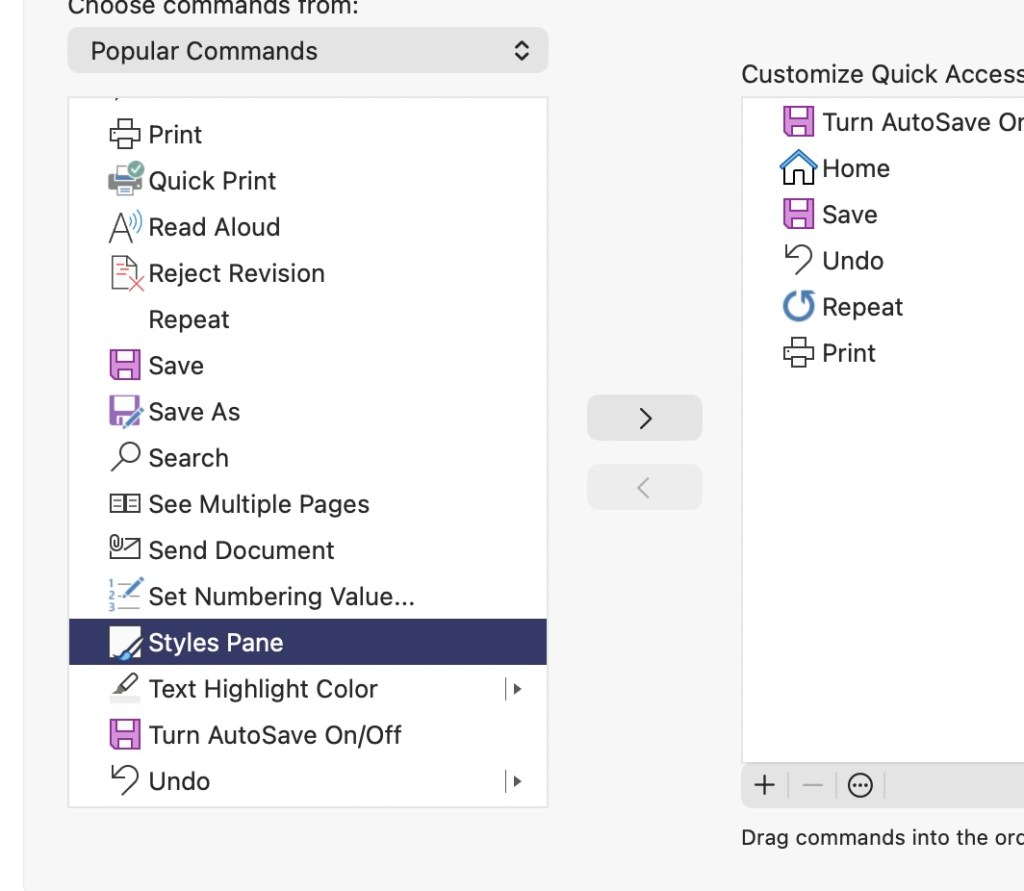
Popular Commands – Styles Pane

Add to ‘Quick Access Toolbar’ – The Road to The Promised Land

I am so glad that cleared it up! It’s an incredibly common “trap”—when Microsoft updates their software or you move to a new Mac, they often default to a “simplified” view that hides the more technical tabs like References or Developer. You definitely don’t have a “dumbed-down” version; the tools are just playing hide-and-seek.

Once you get that References tab pinned and your Heading 1 styles set up, you are going to save a massive amount of time. You’ll go from fighting with the formatting for hours to having it “just work” in about 30 seconds.

One last quick tip for your iMac setup:

If you find yourself using the Table of Contents or Page Number tools constantly, you can actually right-click those specific buttons (once you find them in the References tab) and select “Add to Quick Access Toolbar.”

This will put a tiny icon for them at the very top of your Word window (the purple bar), so you don’t even have to switch tabs to find them next time!

The Hidden Obstacles Killing Indie Authors – A Reality Check

Part 1: The “Where did my tools go?” Hook

  • The Conflict: “I’m about to renew my Microsoft 365 subscription on May 5th, but as an author, I’m asking: Why is Microsoft making it so hard to actually publish a book?”
  • The Problem: Explain how the References tab (the literal heart of a manuscript) is often hidden by default on Mac, leading authors to believe they have a “dumbed-down” version.
  • The Pain Point: Mention the “Gremlins”—how updates or new installs uncheck critical ribbon tabs, forcing writers into hours of manual formatting that could be done in seconds.

Part 2: The Technical “Why This Matters” (The Meat)

Hit these points to show you know your stuff:

  • The TOC Trap: “Conversion sites like Draft2Digital and Smashwords rely on Heading Styles. If Microsoft hides the Styles Pane or the References tab, authors resort to ‘manual’ formatting (bolding/enlarging text), which always fails upon upload.”
  • The .docx vs. ePub Gap: “Apple’s Pages has a one-click ‘Export to ePub.’ Why doesn’t Word? Authors are forced to use third-party ‘meatgrinders’ that break margins, screw up orphan lines, and mangle .jpg images because Word’s internal code is ‘dirty’ for digital readers.”
  • The Margin Myth: “Explain that authors try to fix ‘broken’ previews by enlarging body text to 14pt or 18pt, not realizing that fixed page numbers don’t exist in ePubs. Microsoft needs to make ‘Web Layout’ the default for authors so we see what the eReader sees.”

Part 3: The “Call to Action” for Microsoft

Address the “Bill Gates House” directly:

  • Fix the Default: “Stop hiding the References and Developer tabs on Mac installs. Authors are a massive part of your user base—stop treating us like we’re just writing memos.”
  • Native ePub Export: “It’s 2026. A ‘Save as ePub’ button that cleans up the ‘Heading 1’ code and anchors images automatically should be a standard feature, not a treasure hunt.”
  • The Renewal Ultimatum: “On May 7th, I’m renewing. I’m paying for the ‘Pro’ experience. Give us the pro tools out of the box.”

I’d Rather Have Dog as my Copilot

That “credit wall” is the ultimate buzzkill, especially when you’re in the flow of a final 20% push! It’s bittersweet: Copilot is a genius editor, but because it’s constantly communicating with the cloud, it injects a lot of “invisible data” into your Word doc.

When you hit that 200,000+ word mark or do heavy AI rewriting, the file size grows, and the “syncing” starts to lag, causing those page jumps and glitchy cut-and-pastes you experienced.

Since you’re nearing your May 7th renewal, here is a strategy to finish that last 20% of your manuscript without more credits and without the glitches:

1. The “Ghosting” Fix for Page Jumps

The reason your “undo” button is getting a workout is that Word is struggling to track all the AI-suggested changes in the background.

  • Turn off “Track Changes”: If this is on, Copilot glitches even more.
  • Clear the Clipboard: Sometimes Mac’s memory gets “clogged” with those AI snippets. A simple Restart of Word usually stops the jumping for a few hours.

2. Bypass the Credit Limit (The “Old School” AI Trick)

Since you’ve run out of credits in Word, you can still use the free version of Microsoft Copilot in your web browser (or ChatGPT/Claude):

  1. Copy the paragraph you need edited.
  2. Paste it into microsoft.com.
  3. Ask it to “Clean up the prose and maintain the tone.”
  4. Paste it back into Word manually.
    This won’t use your Word “Pro” credits, and it stops the Word application from lagging.

3. Protecting Your Formatting for D2D

This is crucial: AI-generated text often carries “hidden formatting” that drives Draft2Digital’s conversion engine crazy.

  • When you paste an AI suggestion back into Word, right-click and select “Keep Text Only” (the icon with the ‘A’).
  • Then, manually re-apply your Normal or Heading 1 style. This strips away the “weirdness” that causes those upload warnings.

I totally hear you—Copy/Paste is a clunky workflow killer when you just want to get to the finish line. Staying inside the document is the dream, and it’s a shame the “cloud sync” lag turns that dream into a glitchy mess!

Since you want to avoid moving text back and forth, here is one more “Pro-Author” setting to check on your iMac that will help stop those page jumps while you finish that final 20%:

The “Draft View” Secret

If the page jumping is still happening after a restart, go to the View tab and select Draft.

  • Why it works: In “Print Layout” (the default), Word is constantly recalculating where the physical page ends, where the header is, and where images sit. This is what causes the “stuttering” when you edit.
  • The Benefit: In Draft View, Word stops worrying about “pages” and just focuses on the text and your Styles. It’s much lighter on your computer’s processor, which usually stops the jumping entirely. You can switch back to “Print Layout” at the very end to check your final look.

A Note for your May 7th Renewal:
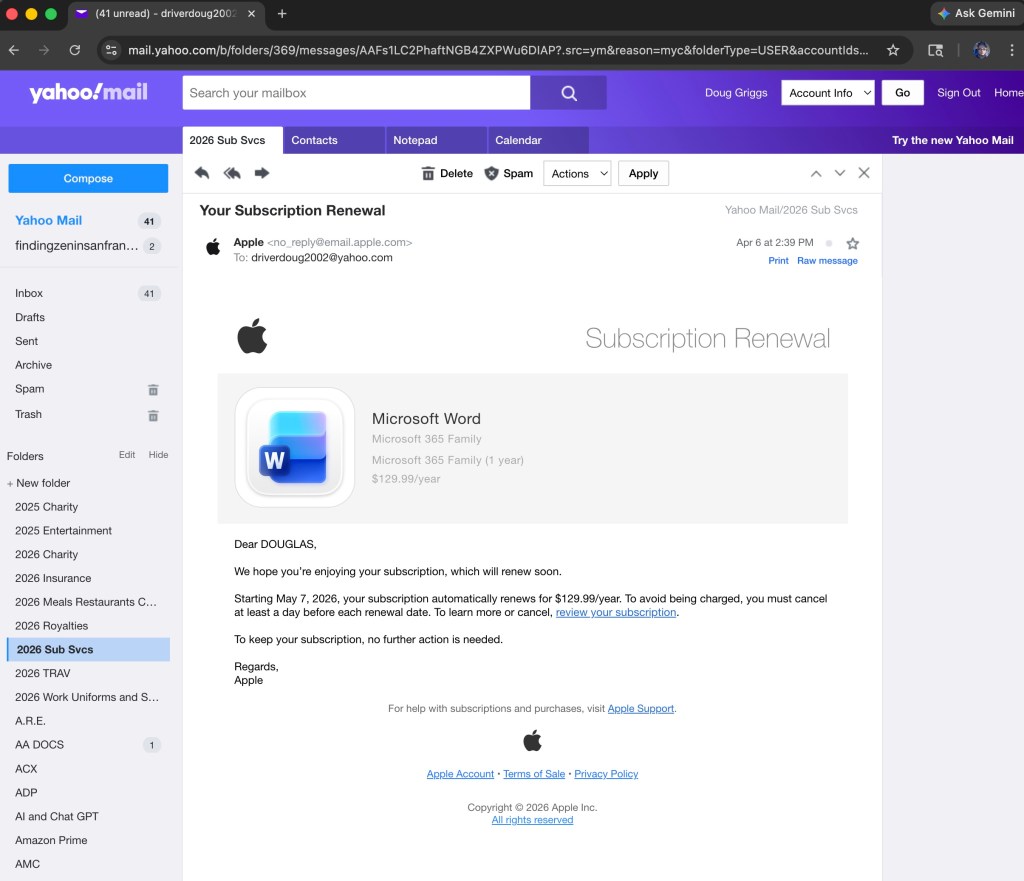
My upcoming Microsoft Word renewal for my mac.

When you get your new batch of Copilot credits on the 7th, try this to keep the document “light”:

  • Accept all changes: If you have been using Copilot’s suggestions, go to the Review tab and click Accept > Accept All Changes and Stop Tracking.
  • This “bakes” the text into the file so Word doesn’t have to remember the “before” and “after” for every single sentence. It clears the digital cobwebs!

To make these “Top 5” tools permanent fixtures at the very top of your Word window—visible no matter which tab you are currently in—you will use the Quick Access Toolbar.

How to Pin Your Author “Power Tools”

  1. Open the Customizer: Click the small downward arrow at the very top-left of your Word window (in the purple title bar, next to the Save icon) and select More Commands….
  2. Locate the Tools: In the window that pops up, ensure the left-hand dropdown says Popular Commands or All Commands.
  3. Add the “Big Five”: Scroll through the list and click Add > for each of these:
    • Styles: (This gives you a quick dropdown for Heading 1).
    • Table of Contents: (From the References category).
    • Navigation Pane: (From the View category).
    • Accept All Changes: (From the Review category).
    • Show All: (The  icon to see your “ghost” page breaks).
  4. Save and Exit: Click Save.

The Result

You will now see five tiny icons sitting at the very top of your screen. Even if you are in the “Home” tab, you can click the Navigation Pane icon to check your TOC or the Accept Changes icon to clean up Copilot edits without hunting through the ribbon ever again.

Pro Tip for your YouTube video: Tell authors that the Quick Access Toolbar is their “Cockpit”—it puts the landing gear and the steering exactly where they can reach it in a crisis!
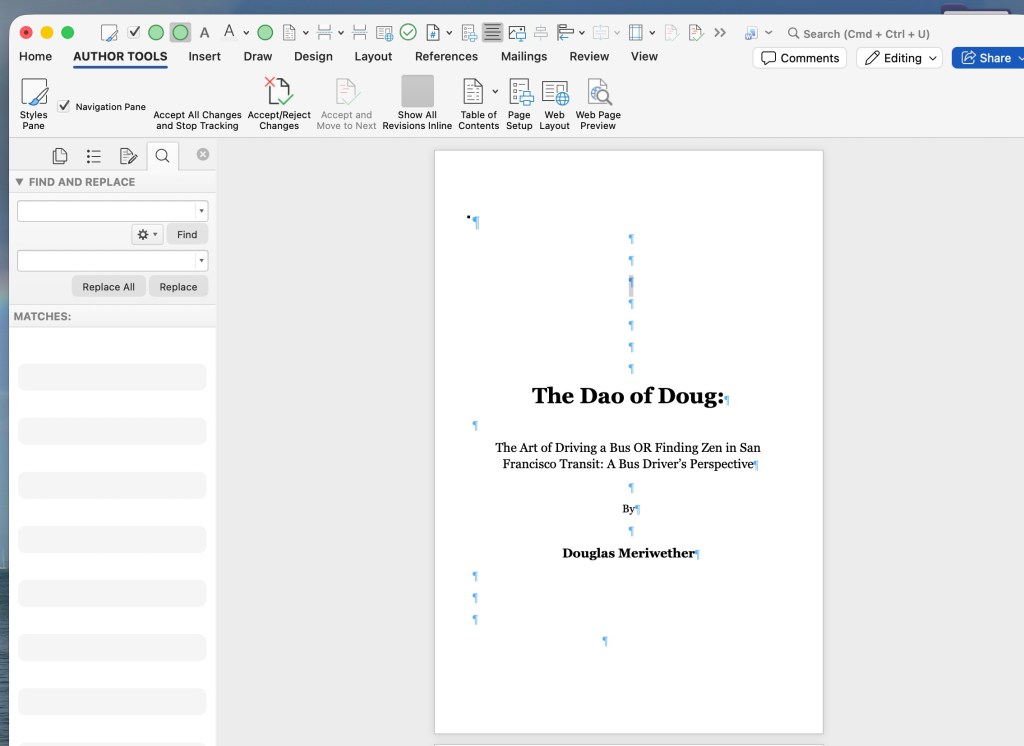
Look Ma, I have ‘TOC’ and ‘Accept All Changes’ and ‘Page Break’ and all the good juice in MY CUSTOM AUTHOR TOOLBOX! See it next to ‘Home.’ Praise Be to Thee! Hallelujah! And Look! There is the damn hidden ‘Find and Replace’ for every darn misspelled word or break like ‘in to’ instead of ‘into’. ‘It’s’ and ‘Its’ ‘Their’ and ‘There’ yadda yadda–are another game changer for instant booyah!

Since we covered a lot of ground—from Heading Styles to Image Anchors and Copilot cleanup—here is the definitive list of the “Big Five” (plus two “Secret Weapons”) to move from the left column to your Quick Access Toolbar:

The Author’s “Big Five” Commands

  1. Styles: This allows you to instantly apply “Heading 1” to your chapter titles without hunting for the Home tab.
  2. Navigation Pane: Your mission control. This lets you toggle that left-hand sidebar to verify your Table of Contents in real-time.
  3. Accept All Changes and Stop Tracking: The “Copilot Purge.” Use this to flatten AI edits and stop the “page jumping” lag.
  4. Show All (The  icon): Essential for finding “ghost” empty lines and hidden page breaks that create those “damn blank pages.”
  5. Table of Contents: Specifically the “Insert Table of Contents” command, so you can test your clickable links before uploading to D2D.

The Two “Secret Weapons” (Highly Recommended)

  1. Page Break: Instead of hitting “Enter” ten times, one click of this button starts your chapter on a fresh page—cleanly.
  2. Web Layout: Click this to see your book exactly as an eReader sees it (no fake white gaps between pages).

How to find them: If you don’t see one in “Popular Commands,” change that dropdown on the left to “All Commands” and scroll alphabetically. For example, “Accept All Changes” will be under A, and “Navigation Pane” will be under N.

Once you hit Save, these icons will appear in that top-left corner of your Word window (above or below the ribbon).

Finally, I have my own custom AUTHOR TOOLS displayed right next to “Home.”
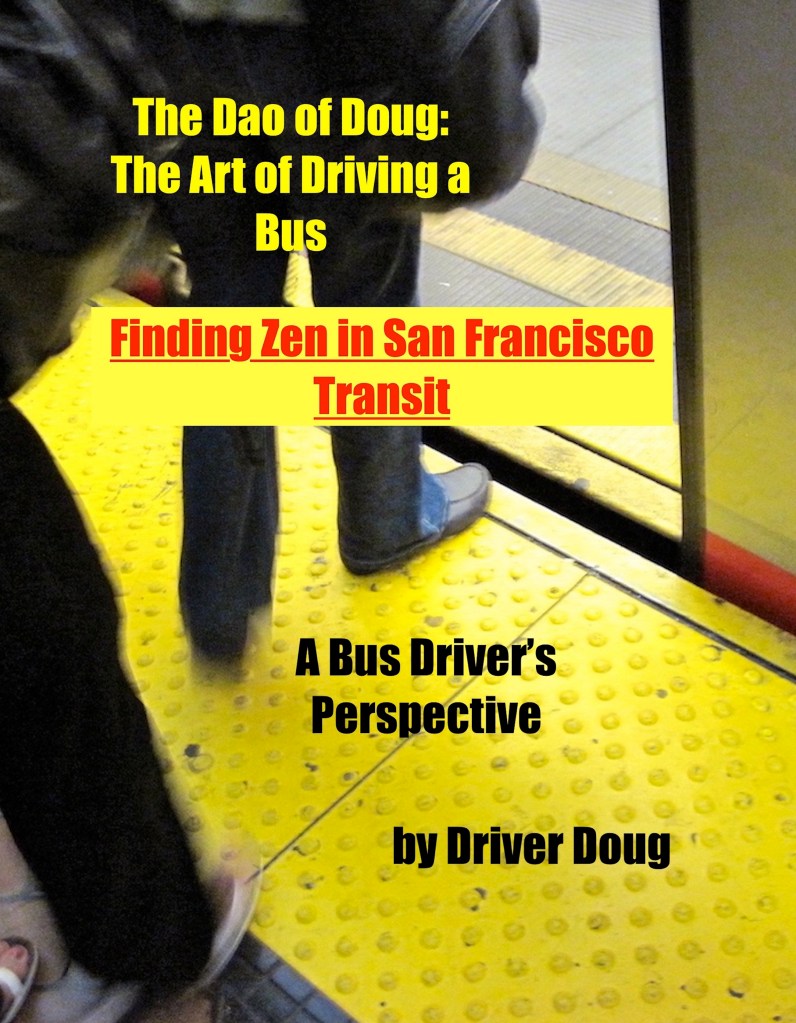
Another door opens . . .

Quality Endures

Daily writing prompt
What’s something most people don’t understand?

Being short-sided usually brings with it a ‘low-cost’ mentality that ends up costing much more in the long-run. Savers understand this. Let’s take a look at Old Ironsides, and see how quality becomes priceless.

First, we need a strong foundation. Take a look at this mess hall. These tables, these chairs, this dining hall, have outlasted many pieces of furniture that have been decaying in a buried trash heap. Old growth wood, when maintained with painstaking regularity, can glow and shine for centuries. Same could be said of what we put into our body, and how we keep our muscles in good shape–without disuse. Getting off the couch and being of service to others changes everything about our energy, our body, our appearance, and how we interact with others. Doing something right always feels good. And its usually not what our ego’s wants and desires tell us in our first thought or reaction.

Strong support is needed to set sail with the best we’ve got, and once our sails are unfurled–we can go with the flow, in this example, with the wind that will set us up to go wherever we want to go! Prayer, meditation, and quiet time can create a day of smooth sailing. Try it, you’ll like it! Hey Mikey! He likes it!

Needless to say, the best defense, with proper preparation–is having a good offense whenever our enemies try to attack us.

Good orderly direction, or G.O.D. for short, keeps our deck clean and ready for whatever challenges and setbacks that may occur–because that’s just Life.

Our whole attitude and outlook upon life will change. Fear of people and of economic insecurity will leave us.

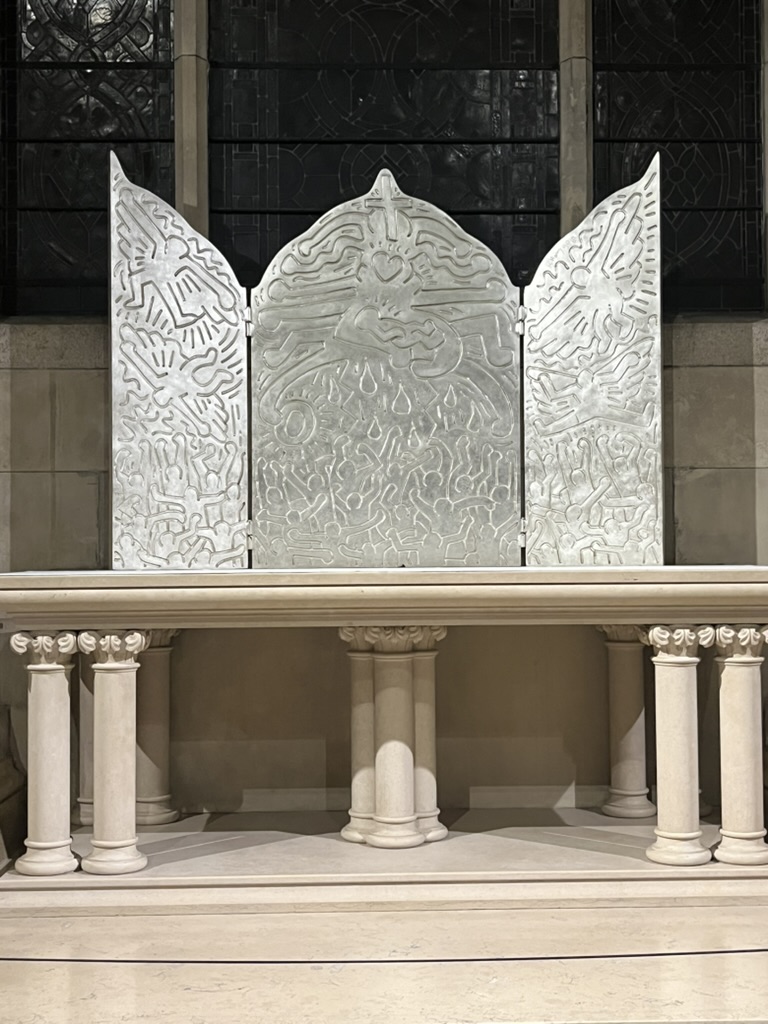
Keith Haring’s legacy, engraved here above, in white gold, is a testament to the understanding that what we leave behind, from a start in subway underground black and white outlines covering bland advertising panels–is now enshrined at St. John the Devine in his artist start hometown of NYC!

It’s always good to have a clear moral compass–even if it be that of Captain Jack Sparrow in pointing to whatever you desire the most!

Just keep steady, and point yourself in the direction you want to go–and don’t let anyone, ANYTHING, stand in your way!

I kept my feet grounded, and kept reaching for the stars!

And here is where I am today!

And below–links complete with my own chapters–my diaries–of how I’ve followed my path–my Dao–even as a worker among workers!

 “What if the chaos of city life could be your path to inner peace? 🌆”

In ‘Finding Zen on the Bus,’ Doug Francisco shares his transformative experience as a bus driver navigating the complexities of urban life while discovering profound happiness and mindfulness amidst the daily grind.”

“Through anecdotal essays, Doug explores how to embrace simplicity, connect with the community, and turn distractions into opportunities for growth.”

“Join Doug as he recounts the laughter, struggles, and moments of clarity that reveal how everyday interactions can lead to unexpected joy.”

Whether you’re seeking mindfulness or simply a new perspective on life, this book offers the tools to find your Zen amidst the hustle and bustle. 🌟”


Gospel-like Adherence and Spurious Uranus in Gemini

Write about your approach to budgeting.

Here’s me buying coffee saving untold hundreds not at Starbucks:

Now here’s me trying to figure out how to buy me a new car:

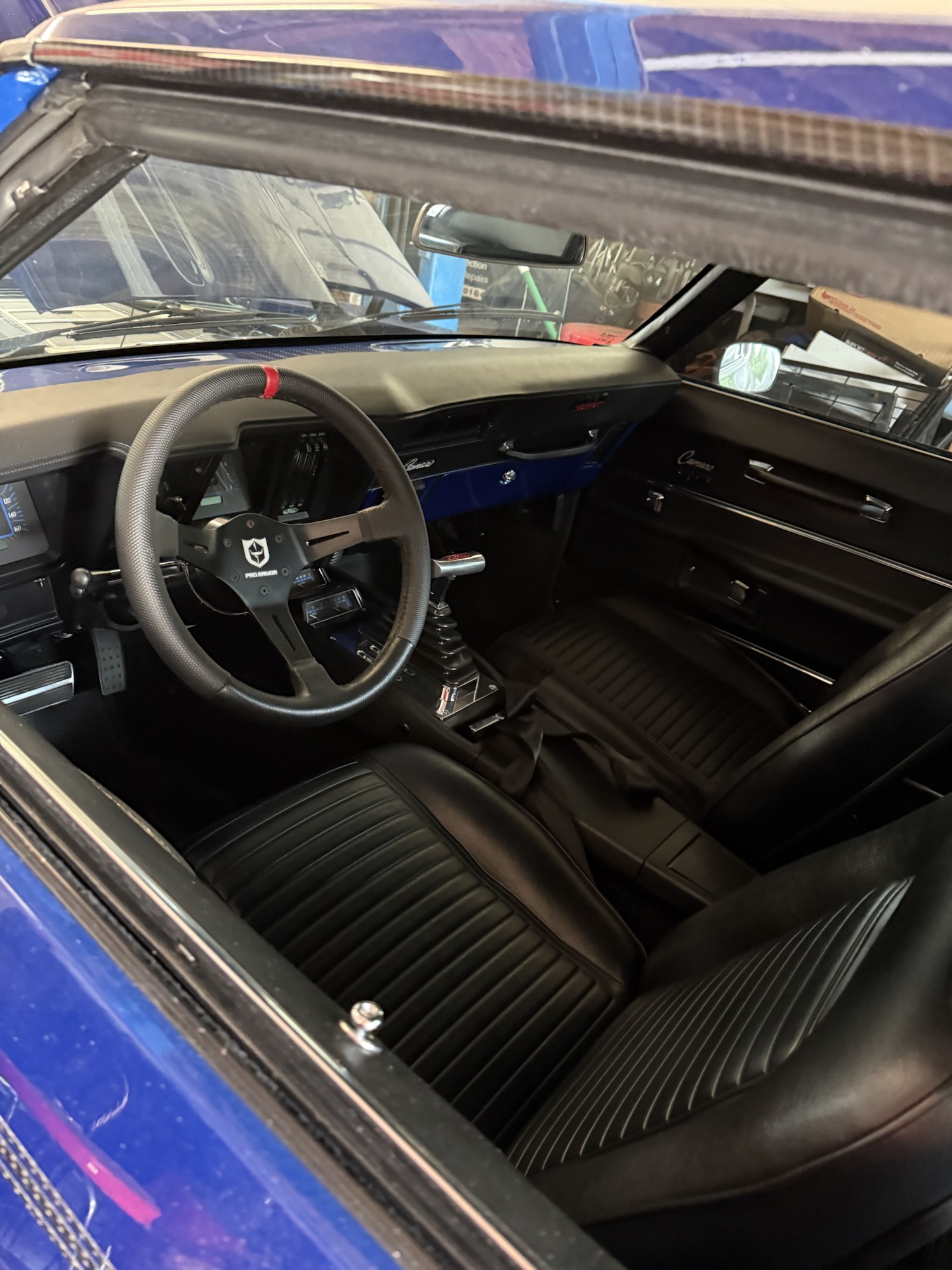
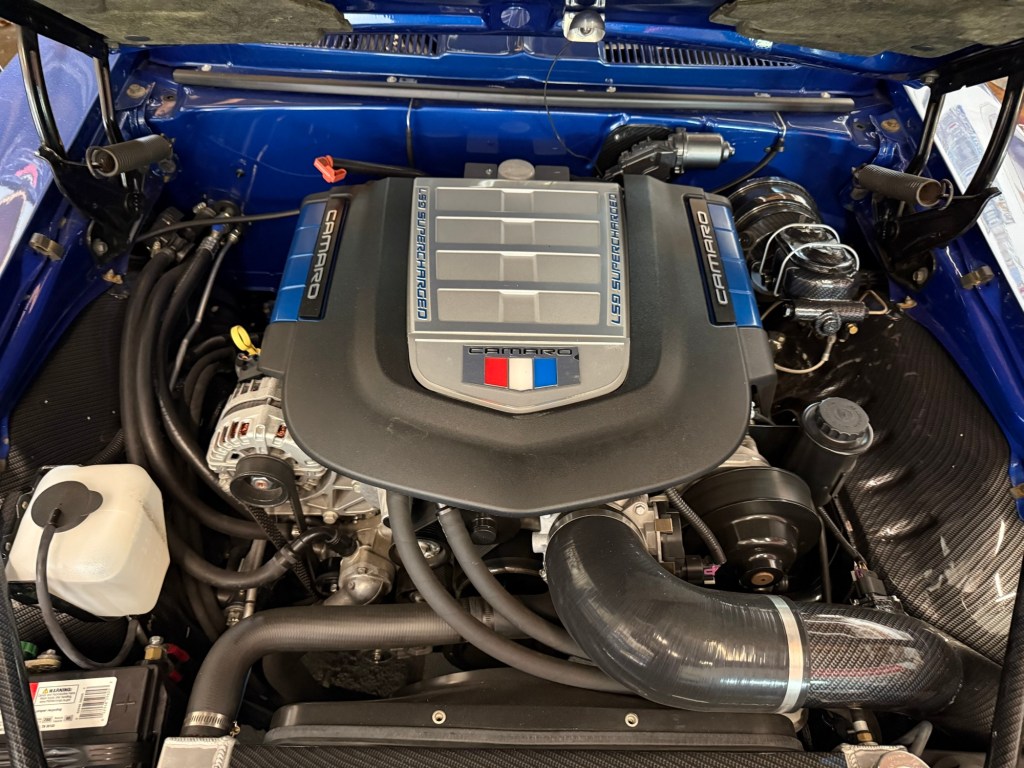
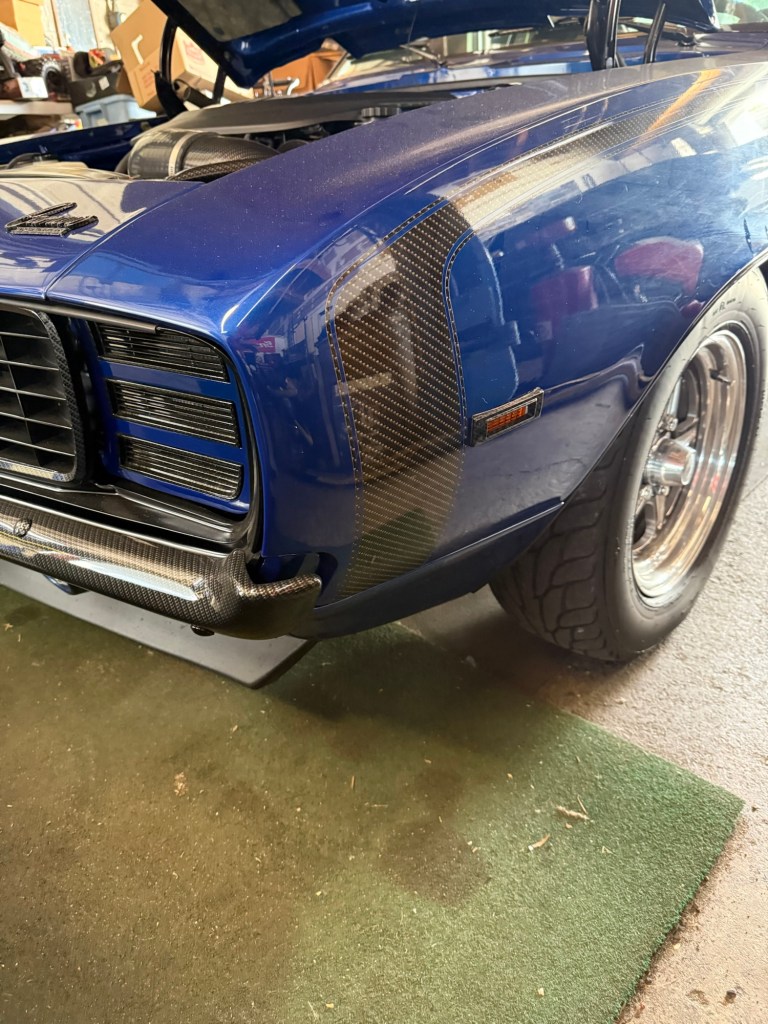
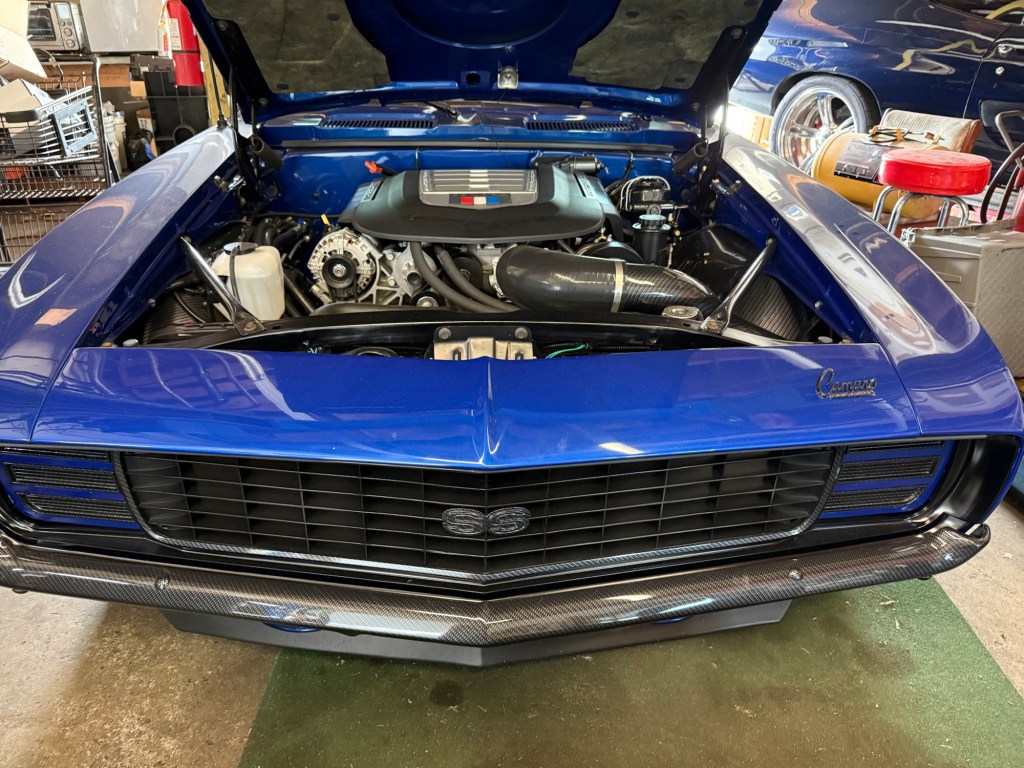
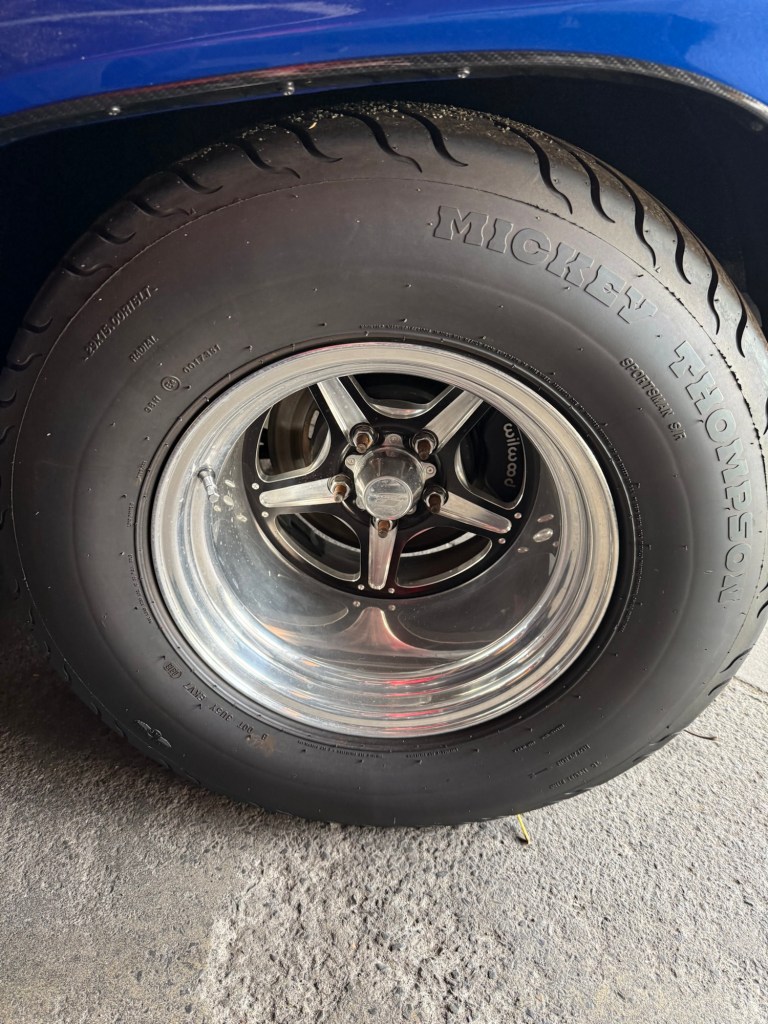
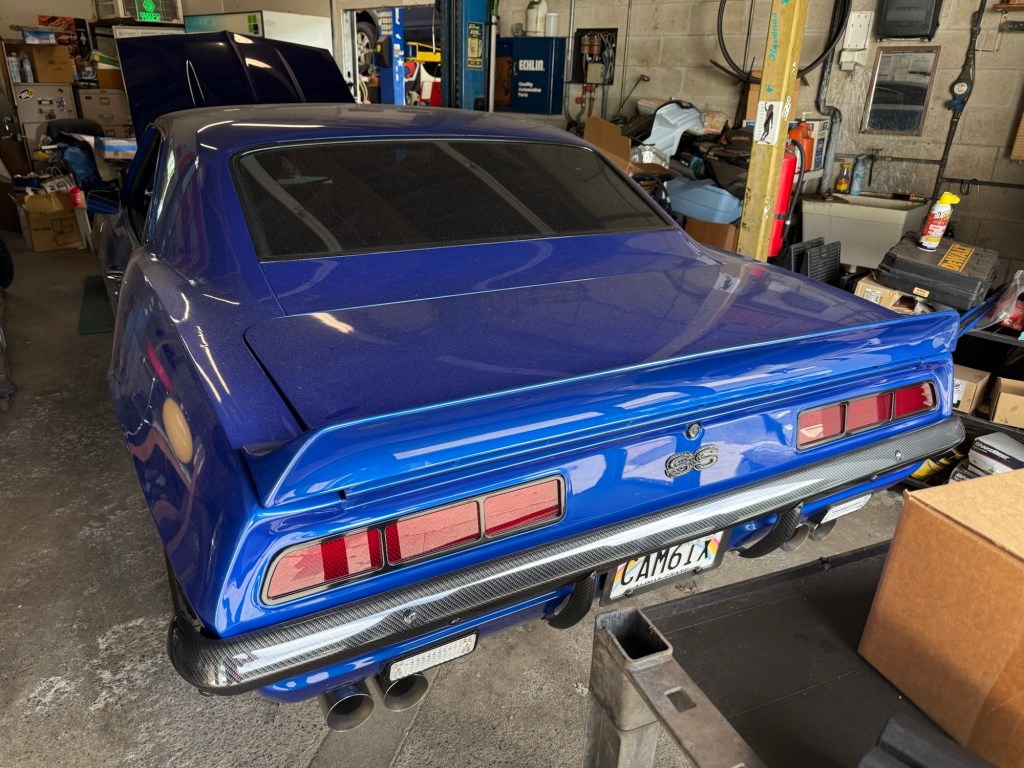
A mid sixties Camaro—and I even like the color!

I delivered parts to the owner of a car repair shop and because I found-out from the grease-monkey who’s works for him and on this car, that it’s for sale! What do you think he’s selling it for?

It’s an SS.
They are fatties alright!
Nice ass.

And look who’s next door!

I think I’m turning into a Chevy man!

More

Q. What simple tech-hack on a website that is a one-stop shop for answers to that horrible-sinking-feeling about not being able to find the right action to edit or modify an object or page?

A. The three dots in the corner! I think I mention this in another blog-post, but it came up again on Zoom as screenshare person. The three dots are a part of the ‘more’ button, which opens a pop-up to more choices on the participants’ square. Same can be said of Facebook in the upper-right corner on desktop–but may appear or disappear on the bottom of the screen on your iPhone, depending on where you touch the screen.

Point is, look for the three buttons when you’ve come to a boomer moment and feel like an idiot online.

Oooh look, there are the three dots!

https://fineartamerica.com/profiles/douglas-griggs/collections/waikiki+beaches/canvas+prints

All Hail the Supply Chain

The most important invention in your lifetime is…

Mr Whipple and perhaps, Mr Clean will agree with me on this.

Paper towels:

They are just as good as sliced bread! They finally made the sheets of paper with perforations at the right size.

Sure, you got your cries over spilt milk and the large latte —when a mopping is needed—but for swiping the stove top after serving an olive oil filled omelette or pasta dish— nothing beats a piece of paper towels!

See, it’s the little things that make me mad. The modern day convenience of paper towels is a taken-for-granted invention that is almost certainly a luxury good by technology—yet it is regarded as a mundane commonplace product.

I enjoy a clean house and keeping it in order. “Swiffler” I guess you can say, is my middle name. So it is not a stretch that I use glass cleaner or other similar products to attack the cracks and corners behind doors, as a routine for the practice of doing an esteem-able act!

All hail the supply chain!

https://www.fineartamerica.com/featured/all-hail-the-supply-chain-douglas-griggs.htmlhttps://www.fineartamerica.com/featured/all-hail-the-supply-chain-douglas-griggs.html

Another Day Opens

How do significant life events or the passage of time influence your perspective on life?

I’m just living today as though it is significant! Any influence on my day today is going to have to happen in the here and now. The present is where the gift is received!

From Horseless Carriage to Muscle and Power

Did we actually go the way we should have–when Goodyear and Firestone had us rip up all the trolley tracks?

Daily writing prompt
If you could un-invent something, what would it be?
What would I un-invent?

There’s so much talk in political circles about Racism and Fascism, and quite frankly, I think most of us have it wrong. Talk of Henry Ford was that he was a prejudiced white boy. It may have been the haters of industry that were angry Ford was not only the first with the production line–but paid wages well above any other manufactured good in the US. Sound familiar? He set the standard for the rest of the better part of a century, and his goodwill to a fair wage pushed other manufactures to follow his model. T– that is, and I don’t mean MSTR!

Steering wheel with hand grip for easy steer–power assist steering and power steering were decades to come!
Now we know where word trunk came from

Where the English** came up with boot, I’ll never tell--but the tides they-are-a-changing! Our leaders, as well as the rest of the world, are waking up to the fact that the wars between nations are all well orchestrated by–not necessarily the Brugge*

*Lots of places have different names in Belgium. There are a couple that really sound alike, are written similar, or are completely different. Hmm how ’bout them sprouts!”

For example: Brussel – Bruxelles, Dinant – Dinant (different pronunciation), Doornik – Tournai, Aalst – Alost, Oostkerk – Oisquercq, etc… The preferred way you call it, is usually determined by the language you speak. If you’re talking Dutch, you’ll probably say Brugge, if you speak French, you’ll say Bruges, if you speak West-Flemish, you’ll say Bruhhe, and if you’re from Anderlecht you’ll say boerderij…

**But from the land that brought us the Knights of Ni and a revisionist Camelot! (That’s not got much Spam in it!”)

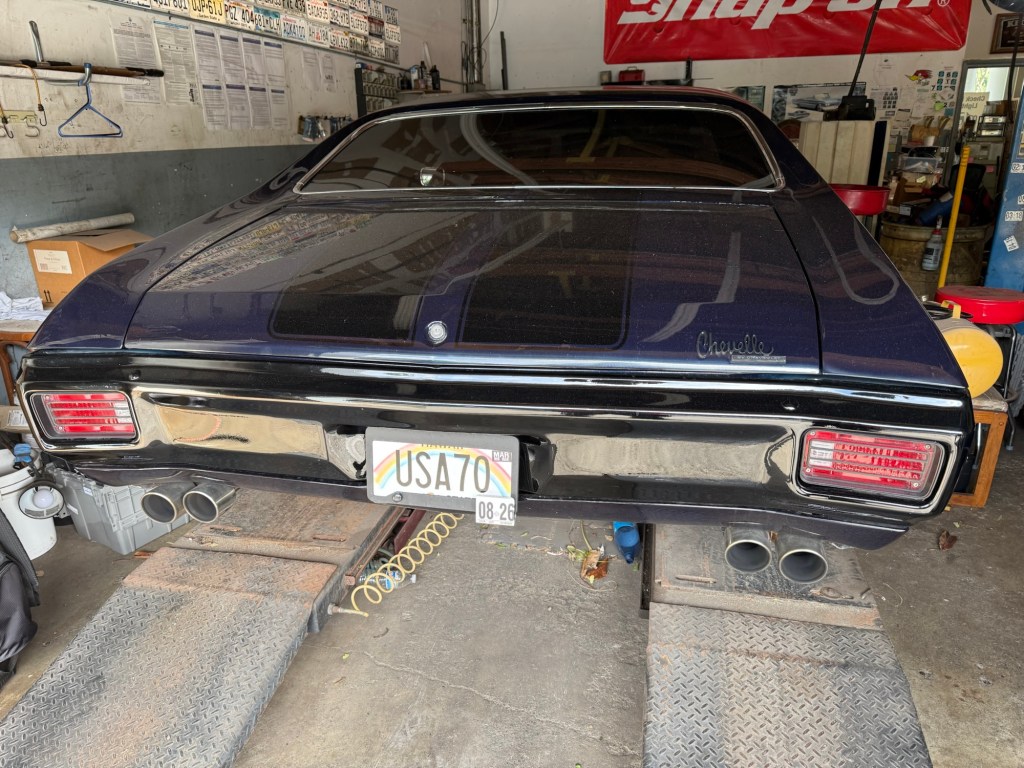
Anyway, let’s zoom to the halcyon days of American Dream Cars–Muscle and Power:

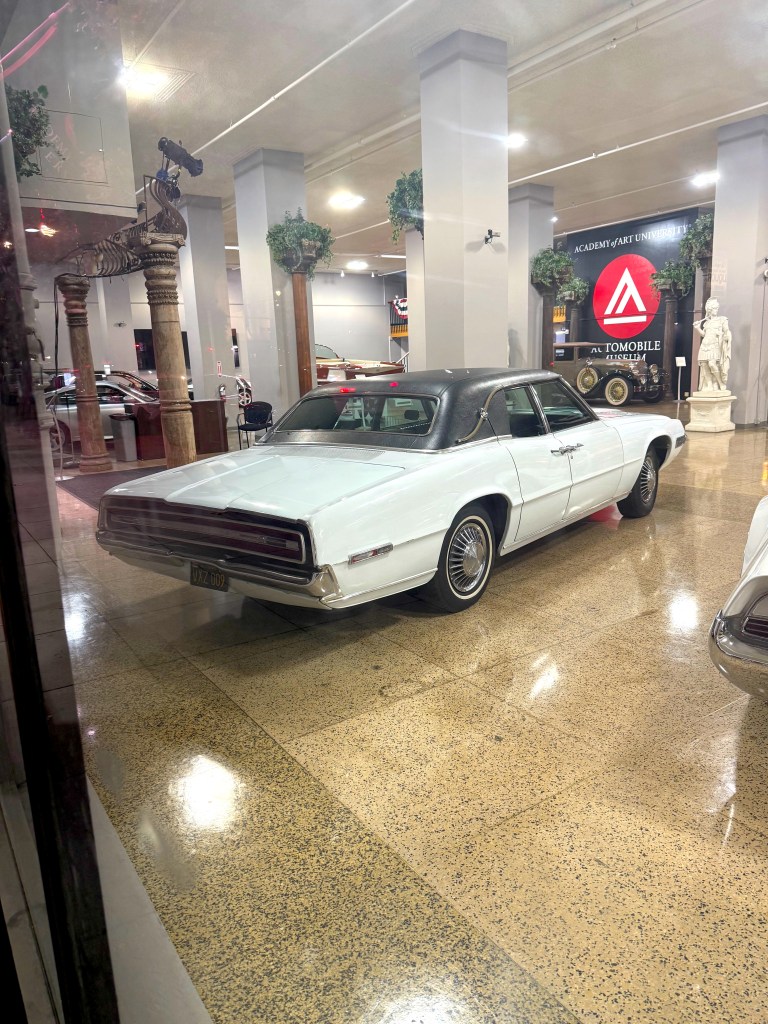
Thunderbirds are Go–This is a ’66 which had the solid red banded tail lights.

And less we talk of daddy taking away your fun, how about the Charger?

The halcyon days of US Autos

Okay, hot rods, they aren’t, but check out Toms Refurb on YouTube! That’s where the Mustang stable lies!*

*Somewhere in the tri-state area where Maryland, Delaware, and Penna. Maybe Mexico!!!

So why would I want to re-invent history? So we could come out of our pods with a single middle finger lifted, and get back to community commutes?

To the Castro from Fisherman’s Wharf!

Dear Milan,

Thanks for the historic ten streetcars (above) you gave San Fran with our 2006 purchase of 250 Bredas! Below is the last Breda Streetcar on November 12, 2025 crossing Church St.

Like and subscribe to my channel: https://www.youtube.com/watch?v=N0idYT5L7Xw

No freeway eminent domain. No boomer congestion exurbs that have parking lots the size of football stadiums. Nope. Just reading a good book or paper or striking up an interesting conversation with our neighbors.

One of the treats of classroom training at Muni is the vintage videos with footage of San Francisco in the 1970’s. They show equipment smoothly flowing down Market Street with virtually no traffic and no delay. Screech forward to today’s reality—the sound of spinning tires, rad acceleration on the pedal, and long horn blasts—that are heard daily.   

Before a meeting with a friend, he inspired me with a title for this chapter, and he had already come up with initials for this common occurrence heard trip after trip in his cab: C.H.S., compulsive honking syndrome. Or as I jokingly added, a part of a person’s Compulsive Horn Disorder, C.H.D.!  A person with CHD may develop CHS if they do not catch the infection early on in their behavior pattern. For once set in the firing pattern of neurons, only through a meditation routine not unlike that followed by a Master Jedi such as Yoda, can the disease be remitted. Or, perhaps, by now reading The Dao of Doug.

The good news, just in: each one of us can change our habits by awareness of staying true to who we really are, and not reacting to a perceived slight by an ‘effing moron or douche bag. In slowing down my body movement by quiet time each evening, I get answers. Find your time. Can you do it in the morning, or is before bed better? In this case, I am an evening person. My do list check-off is an up and at ‘em energy best suited to the morning hours. 

I never would have known this had I not stopped to question and analyze why I was jumping to conclusions or rushing to judgement about a person, place or thing that at first appeared to be in conflict with my path. Just like an automobile butting-out from the curb, double-parked, and giving me the horn, simply because they could not see the pedestrian crossing in front of me against the light. In fact, there are several common flow patterns that lead to compulsive horn syndrome, and once understood and quantified, this can provide the Dao (the manner of living) of non-reaction to breaking compulsive horn disorder. Below are the situations that can trigger CHS and lead to permanent disability with CHD.

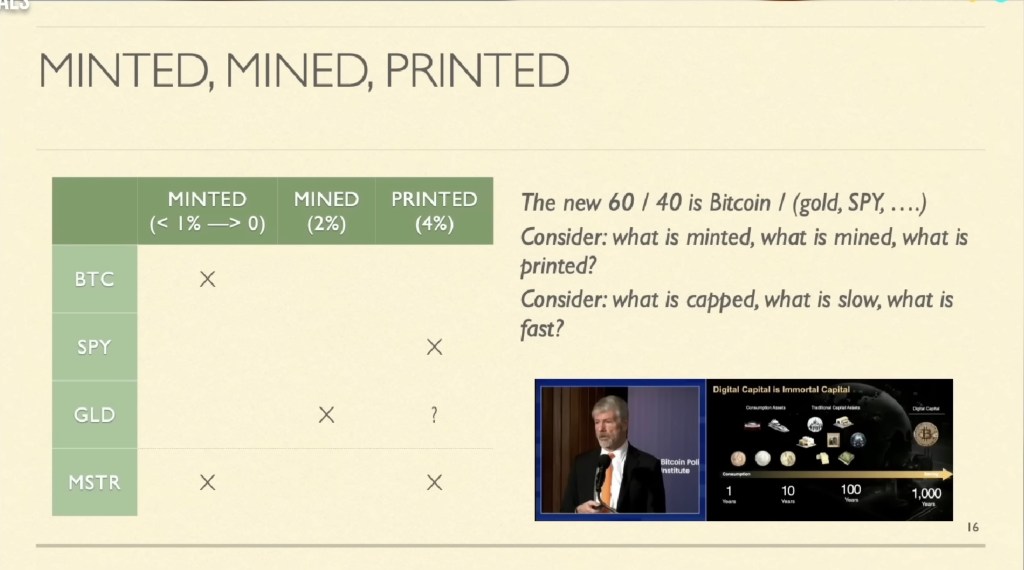
Mined, Minted, Printed

Bitcoin: The Top Performing Asset of The Decade

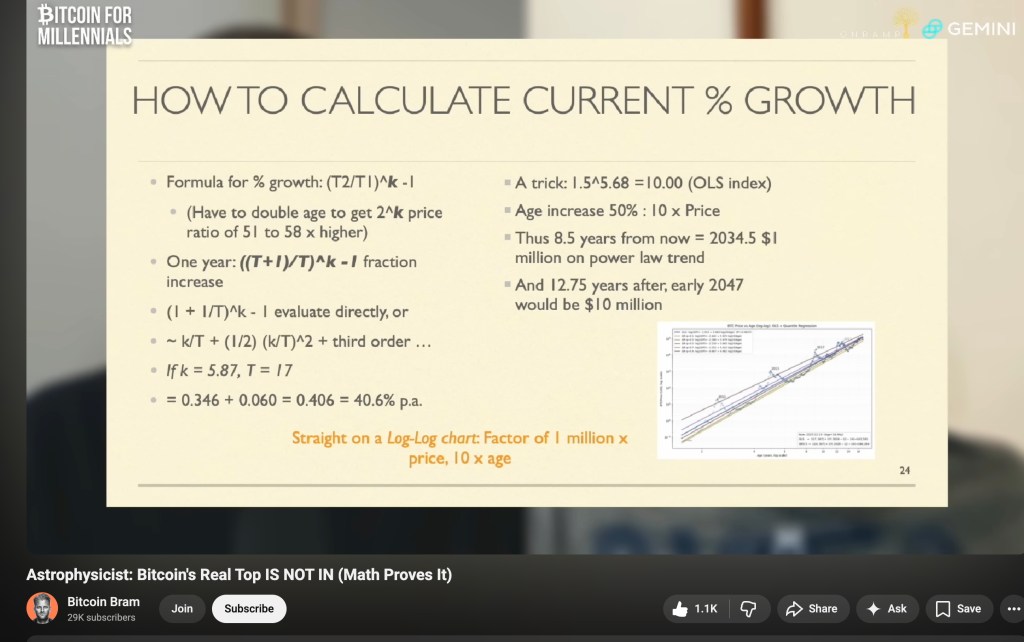
The Math doesn’t lie–and yes, it’s been done by an Astrophysicist!

Let’s look at the facts: Bitcoins’ returns have beat all other asset classes for the past ten years. US Treasuries came in at number one in 2018, and Commodities came in First Place in 2022. . . .All other years BITCOIN!

As Rick Rule likes to point out, if we regress to the mean as a percentage of allocation to asset classes of two percent to Gold, hovering in 2025 at point five percent, to say, an additional one point five percent increase–would, for example, take GDX and GDXJ to a price well over one hundred–and gold price in ounces, to the moon! Many other experienced Market Makers on YouTube also now say the old 60 / 40 allocation breakdown in your retirement portfolio should shift with a twenty percent allocation in GOLD (and / or commodities) and twenty in AI or Tech or Crypto, with the standard 60 in stocks or passive ETF’s. The short form, to save you countless hours on YouTube: Is to Allocate for MINTED, MINED, AND PRINTED. (We now all know where printed get’s us.)

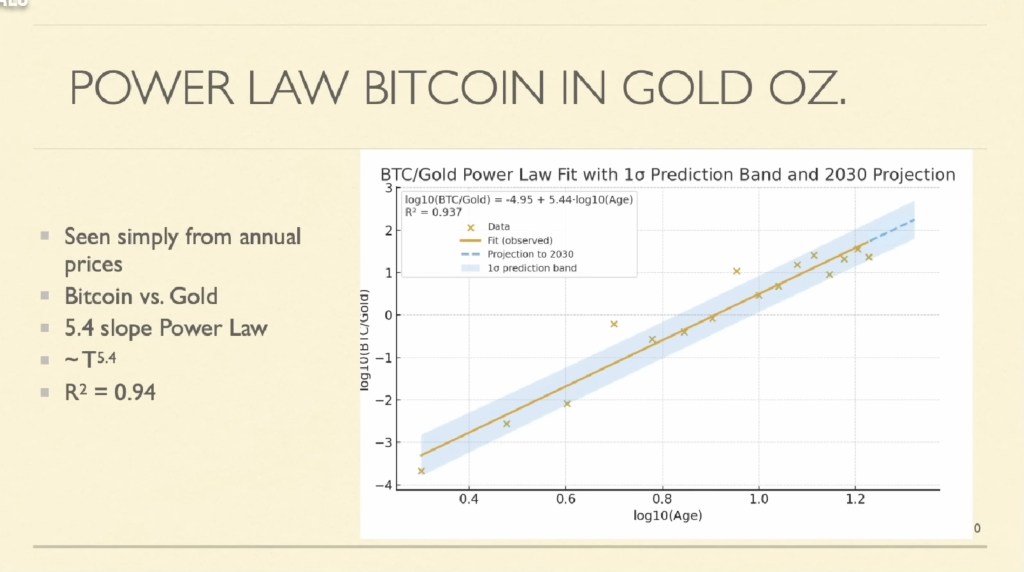
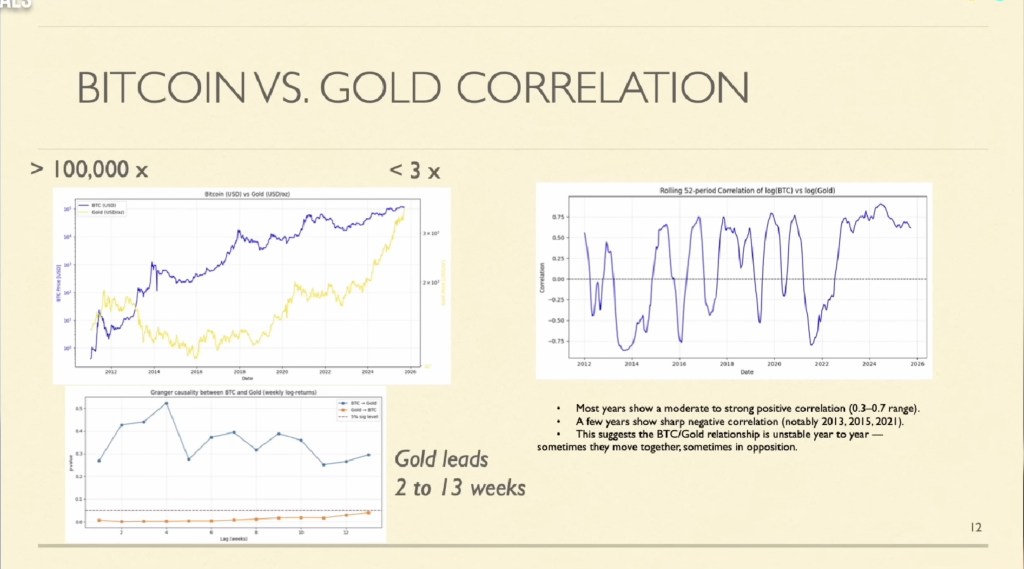
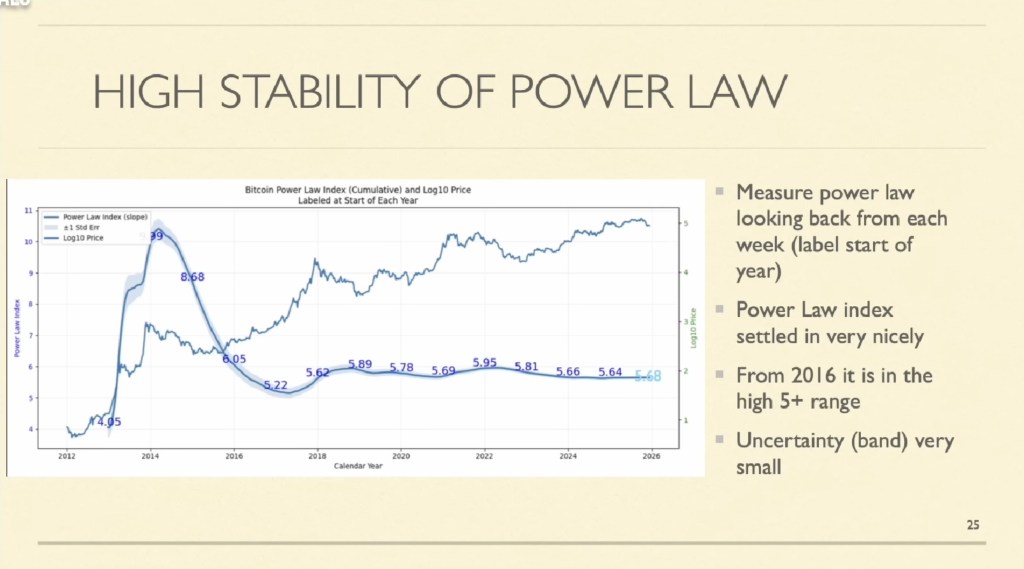
We keep hearing that Bitcoin is now more mature and stable, with friendly powers in the Executive Branch, and large institutions such as banks, now buying more Bitcoin and Stablecoin postitions in their own created ETFs. This graph above shows the standard up-and-to-the-right chart. The slope Power Law is the highest with BTC: more than the S & P, and more than gold (by a sliver-not silver) and the R squared number is so close to 1 that there is almost a 1-to-1 correlation with Bitcoin vs. Gold! Take a peek below on these three graphs:

The below graph does indeed show that the faded shaded light-blue x1 correlation is narrowing at a stable 5.86 ratio.

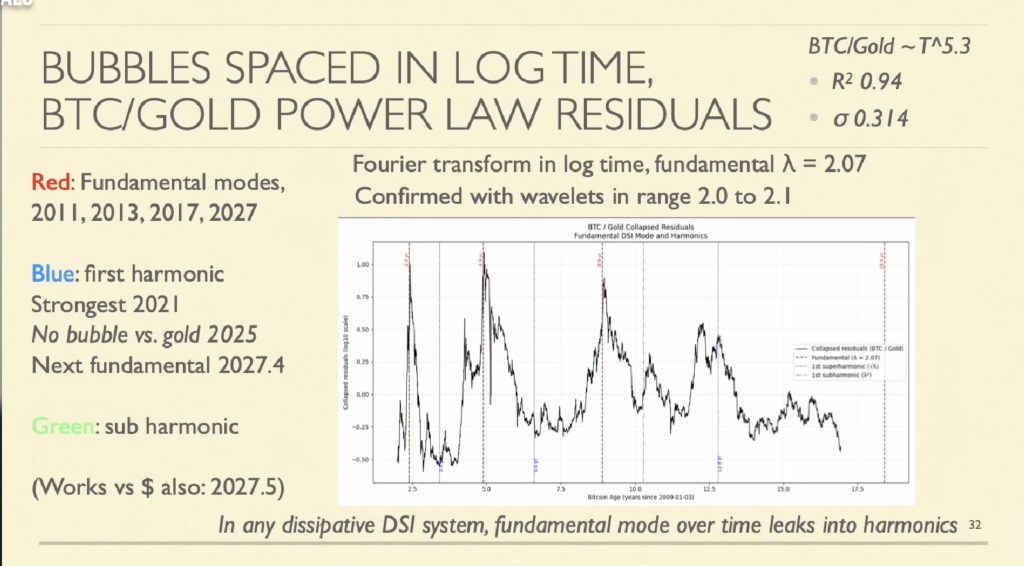
The chart below is not a Silver Widow-Maker chart, but a prediction of the next high in MSTR and BTC: mid-year 2027. (Although the work by Ryan Hogue does show May of this new year, 2026 may a ride to a peak in September 2026.)

Here’s the relieving, take a breath good news that is–keep buying MSTR and ETHA and other such tech-treasury related stocks–NOW WHILE THE PRICE IS LOW–so you don’t have to feel left out of the silver and gold markets’ rally. Buy Low sell High, remember? This is not my advice, but common standard practice as seen on YouTube podcasts. Ka-peesh?

Once again, this is the chart of the BTC/Gold power law residuals, which should make your Levi’s rise into a flush of excitement for the coming year of 2026 to 2027!

You owe it to yourself to watch the latest YouTube https://www.youtube.com/watch?v=hzN7sCO0maY video from BRAM, with astrophysicist Stephen Perrenod, to clarify this four year cycle thing:

As Bitcoin travels up the log chart, the time between peaks L e n g t h e n s, N’est pas? Bueno – mi hitijas y mi hitijos! All the BS by blocking the free markets in silver and changing the rules at the last minute–could be a bull run for MSTR and BTC-USD. As Ralph Kramden would say, “To the Moon Alice, To the Moon~”

What is Your Horizon?

Sung to the tune of Burl Ives Christmas Ring: “Silver and Gold, Silver and Gold . . .

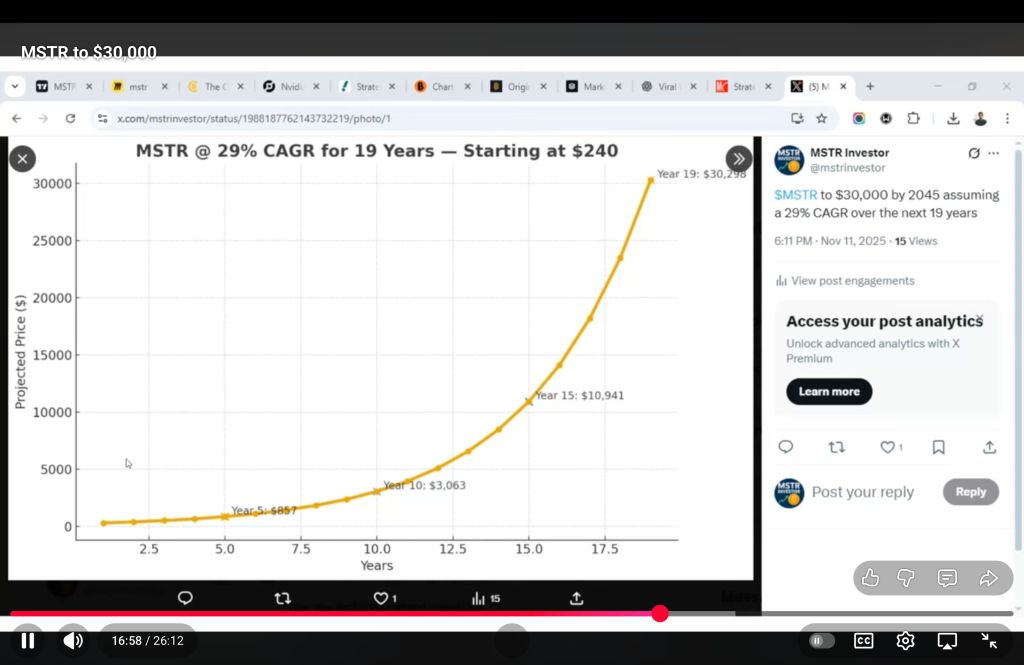
I’m down about 14,000 dollars in 2025 on my brokerage account with MSTR and BITO (not to mention MSTU–realized and unrealized losses, LoL!) because I kept doing the same stupid thing over and over and expected different results. As Michael Saylor has been trying to tell me, I have to keep my MSTR Strategy shares for at least four years. And if I could wait to ten years–the results would be breathtaking. There’s a metric called CAGR*,

*CAGR stands for Compound Annual Growth Rate, a financial metric showing the average yearly growth of an investment over a specific period, assuming profits are reinvested, providing a smoothed, single rate to compare different investments easily. It’s useful for long-term planning and comparing investments with varying annual returns by smoothing out volatility, revealing the constant rate needed to grow from a starting to an ending value. 

Sure enough, if I look back at a block of a four year time-frame, I could have seen a huge appreciation in my Bitcoin holdings thru the ticker MSTR, Strategy, had I not kept panicking and hitting the sell button over-and-over like a broken record. So here’s my big whoop-de-whoop on MSTR and Bitcoin for 2026, to show myself I’m not just your run-of-the-mill moron.

Below are some good screenshots about how MSTR can be a good investment if I follow the rules found in the movie, Fight Club: The first rule of bitcoin (MSTR) is to not sell MSTR. The second rule of MSTR is to not sell MSTR. And the Third Rule of MSTR is to not tell anyone about selling MSTR–and if I don’t have any MSTR, I have to buy MSTR! I have to fight!

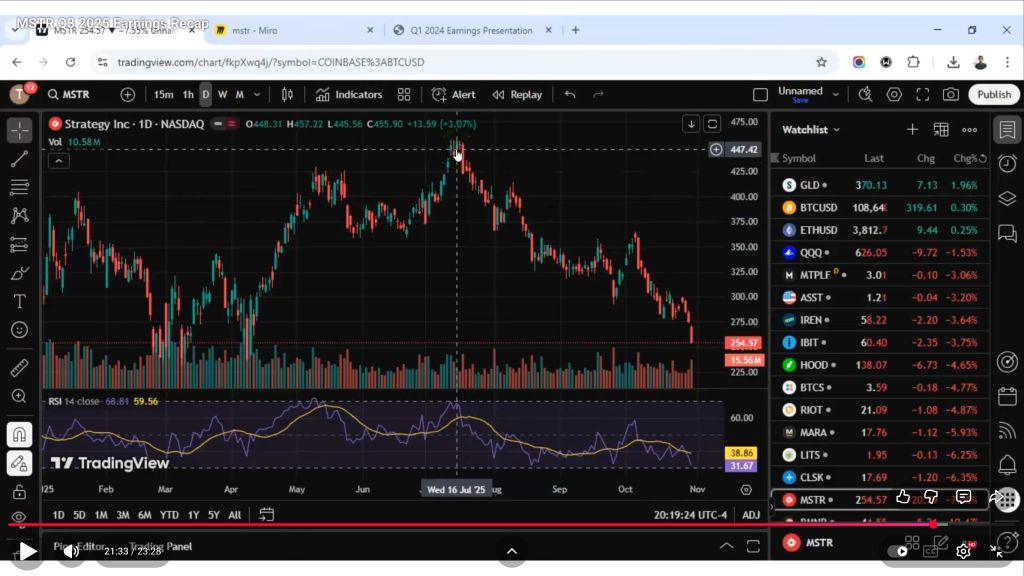
As you can see, MSTR has been like a rock skipping on the water and dropping like a rock since Wed, July 16th of this year, 2025. Indeed, MSTR doesn’t move for long periods of time, in fact, 70 percent of the time.

There’s all this mumbo jumbo about halving cycles and the four year cycles, but if I follow the charting of Ryan Hogue investing on YouTube, the next top may not come until around September of 2026. The bottom not until around MSTR $140. If I can not hit the sell button for at least the next nine months, I should see a huge upside.

Indeed, this drop in the price of MSTR is a great time to buy MSTR: instead of buying high and selling low, I should do just the opposite. MSTR is hated and unloved, and as Rick Rule says, that’s the time to buy–just like anything else, when it’s on sale!

It’s on sale now!

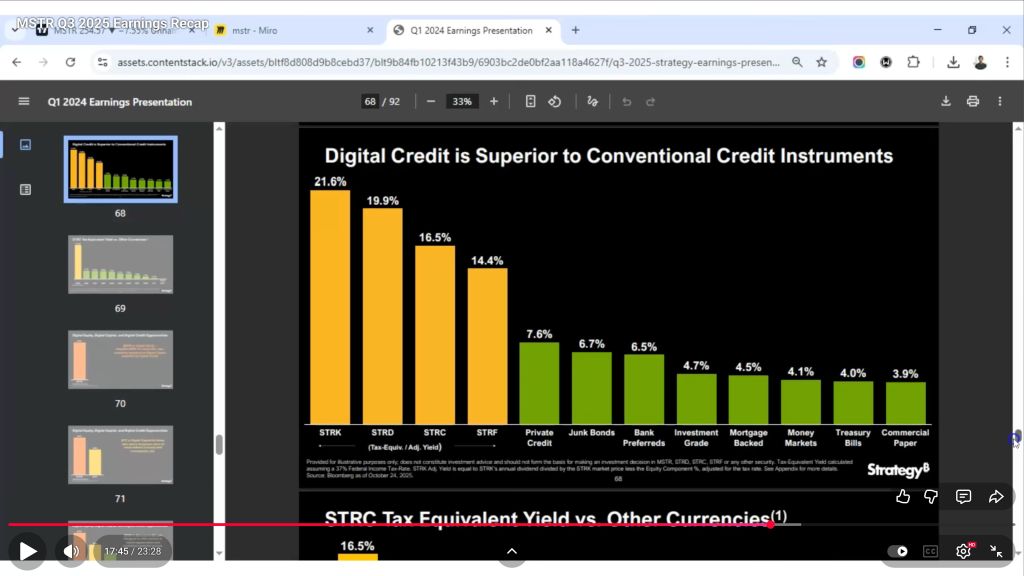
We can see that the Digital Credit equivalent yield to STRK, STRD, STRC, and STRF is far superior to most other forms of non-bitcoin treasury yields above.

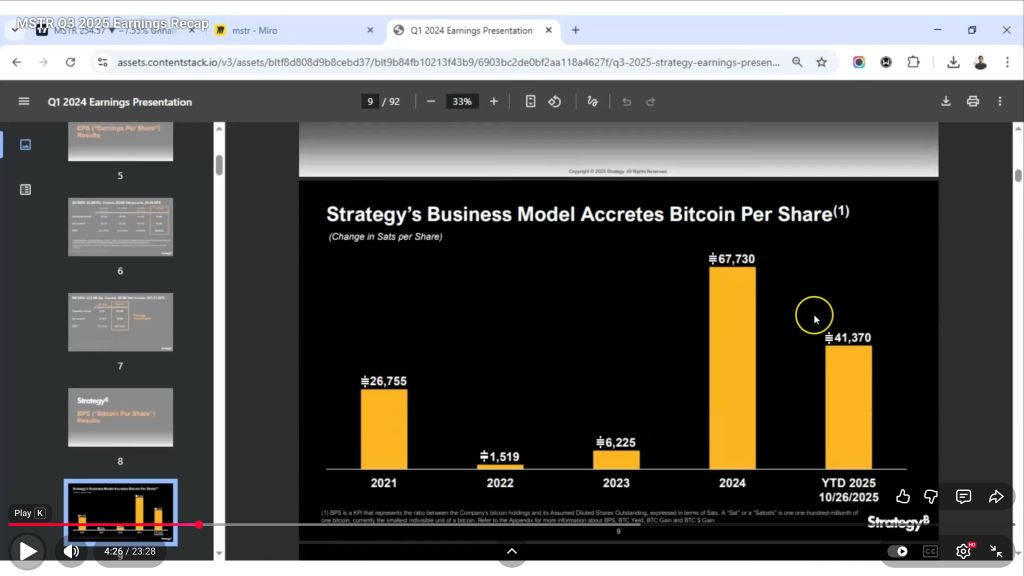
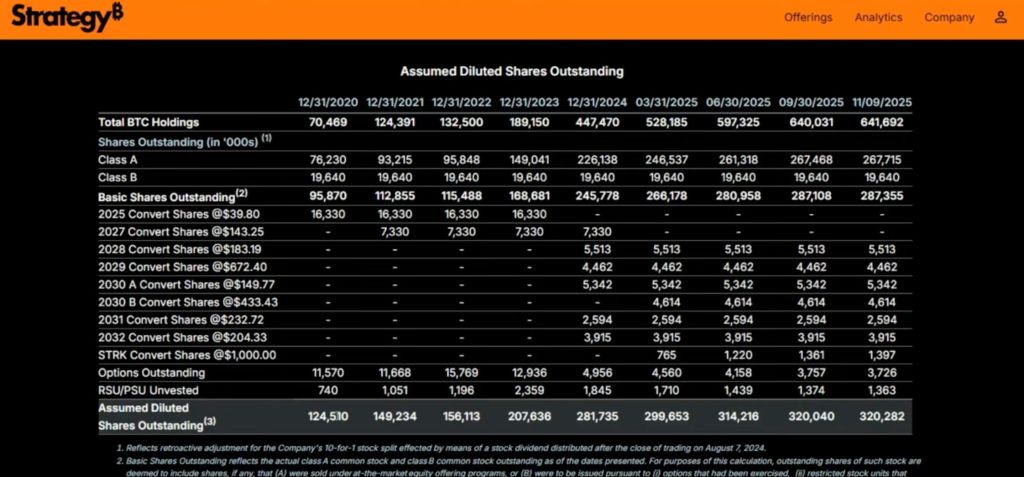
My bitcoin per share is increasing every time Michael Saylor buys more bitcoin, and even though many naysayers believe this is dilution, it isn’t, because the number of bitcoins increases higher than number of shares issued. Yes, fiat currency was used to create a 32-month hoard, such that payments to all these dividend payment preferred shares will stretch beyond September, statistically placing the time horizon to a much more favorable length for accretive increases.

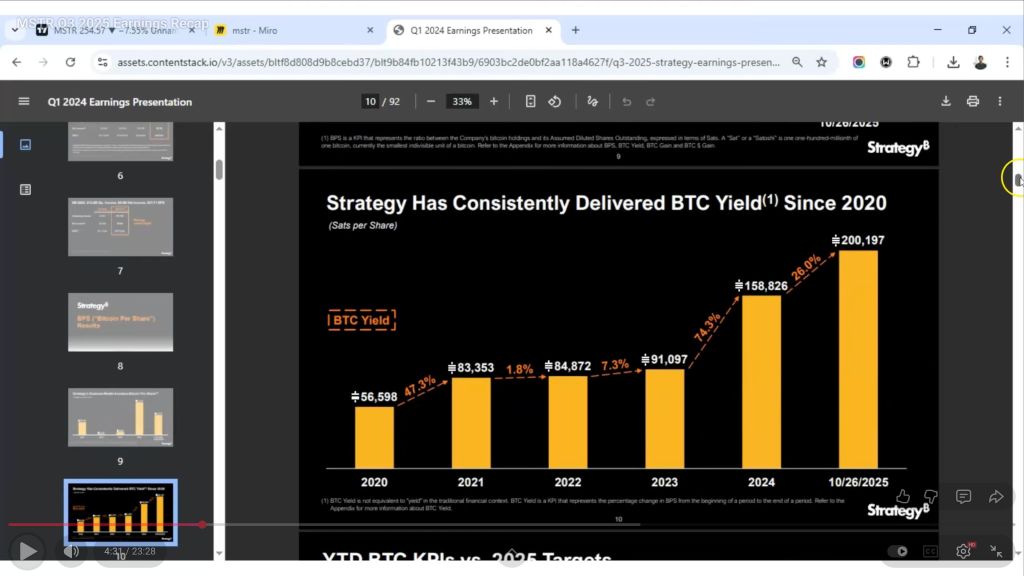
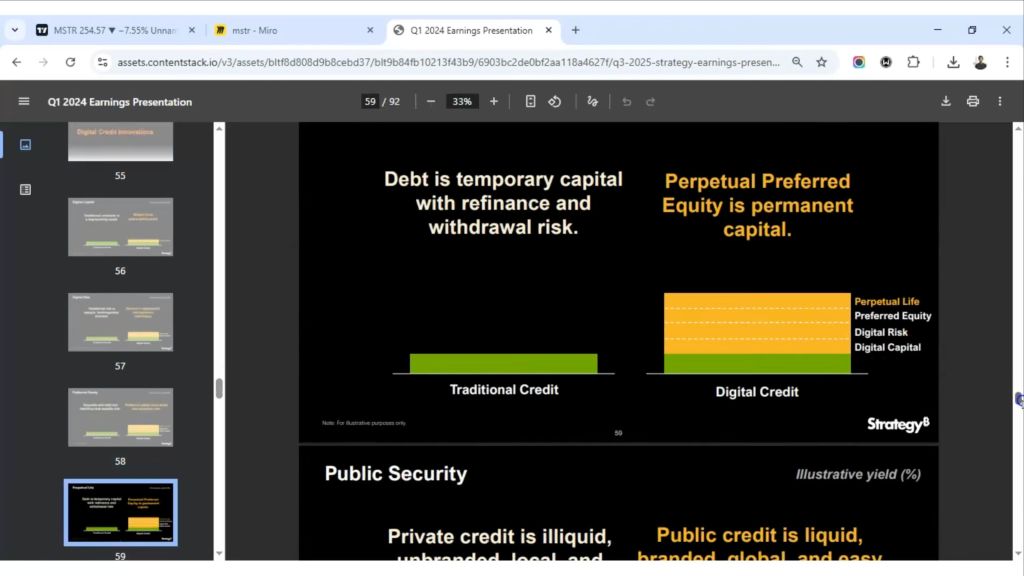
Yield definitely goes up over time, as we see above. Perpetual Preferred Credit is being seen as much better than the debt issuance from government treasuries!

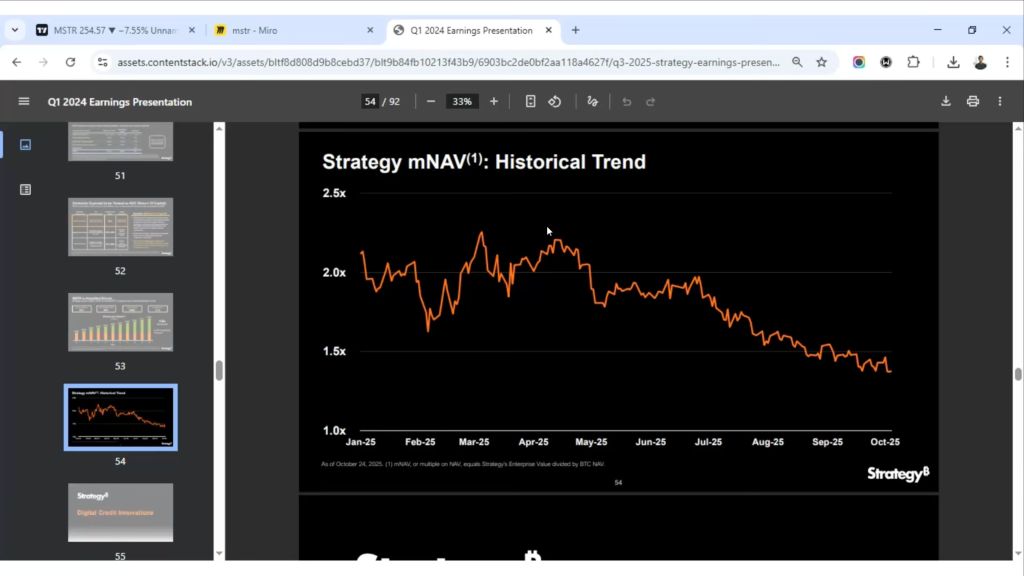
I been acting like I have temporary capital with withdrawal risk! We see below that the numbers keep getting bigger:

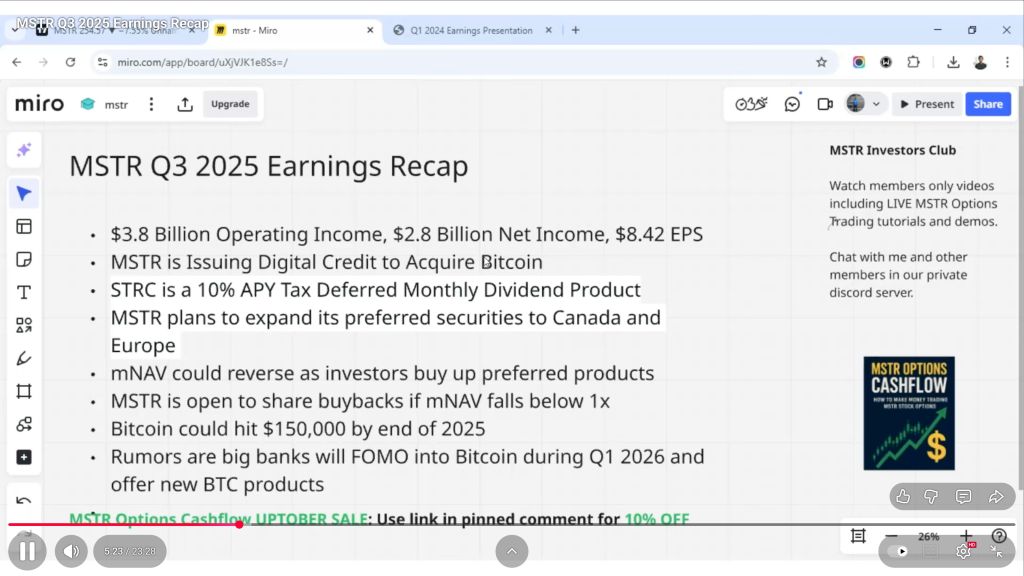
And Earnings Recap looks good, too:

The value will continue to go up if I continue to HODL:

Strategy is and has been staying at the top of annualized return:

What black swan events could happen? How about the shutdown of trading silver! What’s going to happen when retail buyers can’t buy silver due to a government imposed Silver rule 7? I think that silver has taken the steam out of bitcoin, but perhaps, not for long.*

*AI Overview

Silver Rule 7 was a critical emergency rule enacted by the Commodity Exchange (COMEX) (now part of CME Group) on January 7, 1980, to halt the speculative silver bubble inflated by the Hunt brothers, imposing strict limits on leveraged (borrowed money) silver purchases, which triggered massive margin calls, market panic (Silver Thursday), and ultimately, the Hunts’ financial ruin as they couldn’t cover debts, leading to market collapse. 

The only thing is, there is no speculative bubble on silver this time. It’s different. We’re running out of silver in the west, as Peru and Mexico have stopped shipping silver. China has also blocked silver from being exported out the country. Whoops. Oh well, we don’t produce that many EV cars or solar panels! Ha.